· AI Infrastructure · 7 min read
TOON Won’t Cut Your LLM Bill in Half: Fix Bloated Responses First
TOON is genuinely useful for big structured blobs. But most LLM cost in real apps doesn’t come from JSON in your prompts – it comes from over-polite, overlong answers and chat history bloat. If you want a smaller bill, don’t just compress data. Teach your stack to shut up sooner.
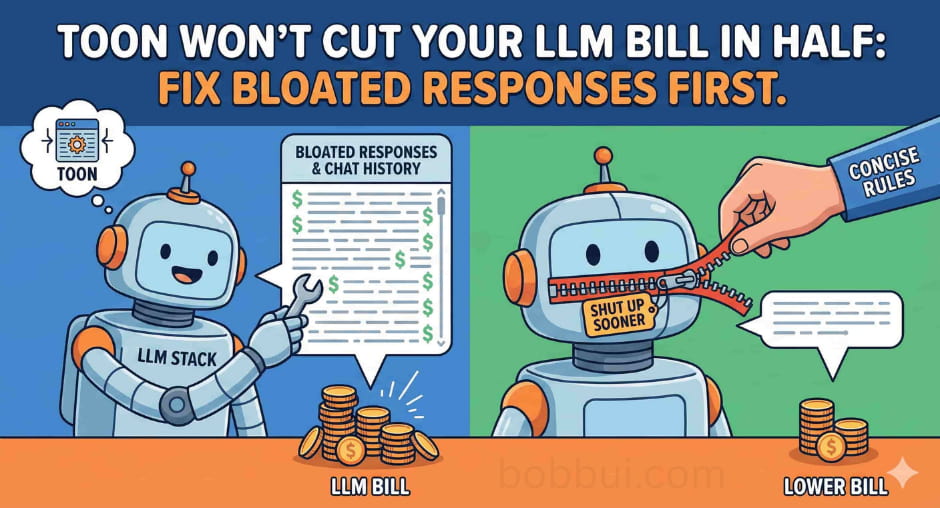
If your feed looks anything like mine, you’ve probably seen a wave of TOON posts: “JSON for LLMs”, “Bye bye JSON”, “Slash your LLM bill”.
TOON is clever. It’s a compact, human-readable encoding of the JSON data model that keeps structure but drops a lot of punctuation noise. [1] It helps when you’re shipping big structured blobs into a model: logs, tables, multi-agent payloads.
The catch: most real token burn doesn’t come from those blobs.
It comes from bloated responses and long-running chats.
LLMs are almost tuned for maximum bloat by default. You see it everywhere:
- Verbosity – re-explaining basics, repeating your question.
- Sycophancy – “Great question!” / “You’re absolutely right…”
- Hedging – “It’s worth noting that…” / “It’s important to mention…”
- Formulaic fluff – intro → lecture → recap → apology.
That’s all pure token tax.
If you want your bill to go down in a visible way, you don’t just compress JSON. You teach your stack to shut up sooner.
What you’ll get from this post
If you’re skimming, here’s what this is about:
- A quick mental model of where your tokens actually go in a chat stack.
- A clear lane for when TOON is worth the trouble.
- Simple system-prompt rules you can drop in to cut response tokens.
- A small checklist you can run on your own app this week.
TOON’s actual job: shrinking structured prompts
Let’s give TOON its flowers first.
From the spec, TOON describes itself as a “compact, human-readable encoding of the JSON data model that minimizes tokens and makes structure easy for models to follow” - basically JSON tuned for LLM prompts. [1]
The idea:
- Keep the same data model as JSON.
- Use indentation (YAML-ish) for nesting.
- Use a tabular layout for arrays of objects:
- Declare the field names once.
- Stream rows beneath them.
That gives you:
- Less punctuation.
- No repeated keys per row.
- A format that’s still readable by humans and reversible back to JSON.
A toy example:
{
  "users": [
    { "id": 1, "name": "Alice" },
    { "id": 2, "name": "Bob" }
  ]
}
In TOON, the same thing looks like:
users[2]{id,name}:
  1,Alice
  2,Bob
Same meaning, fewer tokens.
On realistic tables and log payloads, multiple benchmarks report 30–60% fewer tokens versus JSON for that structured slice. [2] [3]
So yes:
- If you’re passing thick tables, logs, metrics into a model,
- And those arrays have a uniform shape,
TOON is a strong format choice.
Just don’t confuse “30–60% fewer tokens on this blob” with “30–60% fewer tokens across the whole request”.
Where your LLM bill usually comes from
Most hosted models charge per token on both input and output. And for many text models, output is more expensive than (cached) input.
For example, OpenAI’s realtime text models currently list:
- $4.00 / 1M input tokens.
- $0.40 / 1M cached input tokens.
- $16.00 / 1M output tokens. [4]
So a rough mental model:
- Input is cheaper than output.
- Cached input is cheaper again.
- Output is where you really don’t want waste.
Now picture a typical chat/agent call. Rough breakdown:
Input
- System prompt.
- Tool / function specs.
- Recent chat history.
- Current user message.
- Structured context (where TOON helps).
Output
- The model’s answer.
TOON only touches that last bullet in the input section.
Meanwhile:
- Long, over-explaining answers inflate output tokens.
- “Let me recap what you just said” inflates output and later input (because it gets fed back as history).
- Very long chats quietly balloon the history section.
When you actually log token usage per request, a common pattern is:
- Structured context (logs/tables) is non-trivial but not dominant.
- Output and history combined are the big, boring sources of cost.
That’s why “swap JSON for TOON” can be a nice local optimisation… but not the hero.
The real lever: teach your stack to be blunt
The good news: making models less chatty is not complicated.
Here are the knobs I reach for first.
1. Flip every “concise” switch you can find
If you’re using hosted chat apps:
Set the style to concise or brief if there’s a toggle.
Make short the default:
- Show a tight answer.
- Let users click “more detail” if they want a lecture.
Most users don’t actually want a 1,000-word essay on “what is an index”. They want the one thing that unblocks them. For example, This is how you do it in ChatGPT:
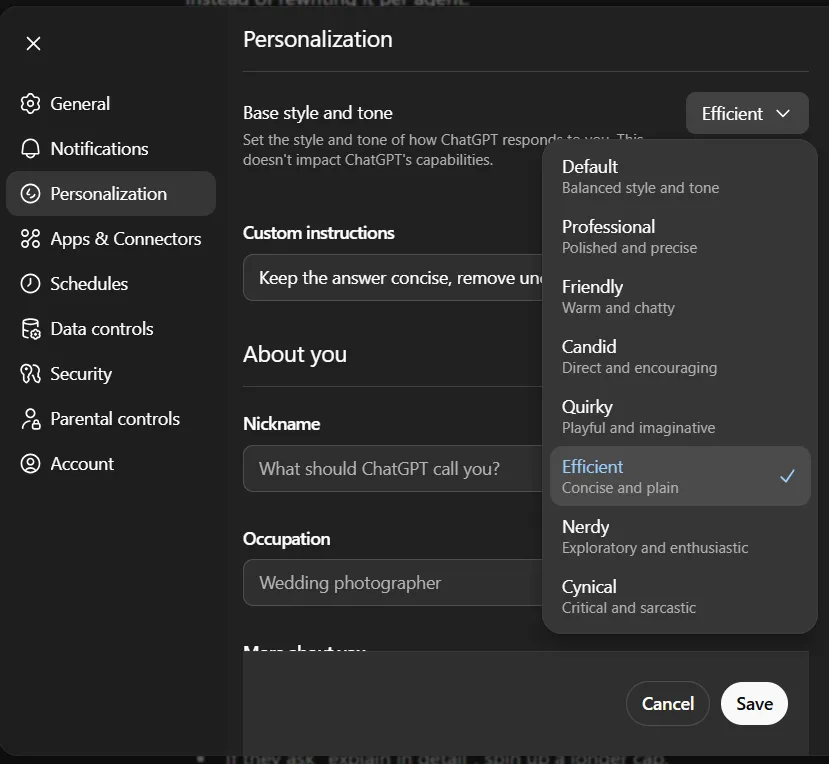
2. Add one blunt style block to your system prompt
For custom apps or agent platforms, I like a short, explicit style section:
Style rules:
- Keep answers concise by default.
- Remove filler like "great question", apologies, and long preambles.
- Skip basic definitions unless the user asks.
- Prefer bullets and direct steps over long paragraphs.
- If the user wants depth, they will ask to expand.
That’s it. Not a 40-line constitution. Just a few rules that give the model permission to get to the point.
If you have multiple agents, put this in a shared “house style” message so they all inherit it.
Let’s look at how much it shortens in ChatGPT when we combine both concise switch and an simple system prompt (“Keep the answer concise, remove unccessary filler and fluff language.”). A whooping ~30% reduction in output tokens:
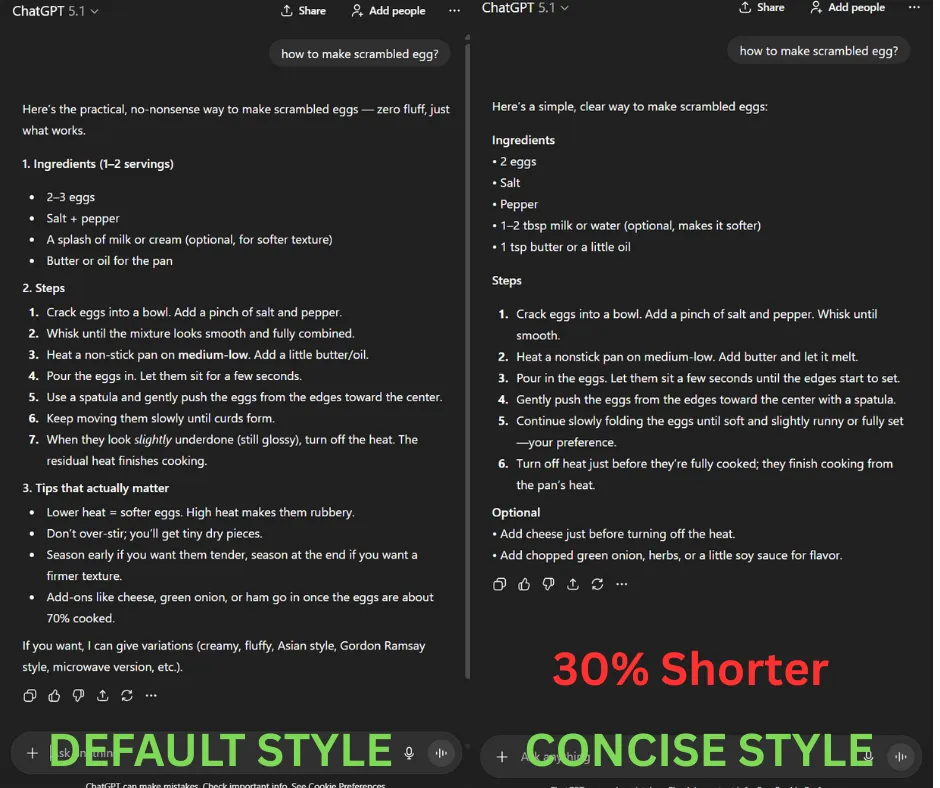
3. Treat max_output_tokens like a budget
max_output_tokens isn’t a safety net; it’s a hard ceiling on how much the model can ramble.
Practical pattern:
Use small caps for:
- Simple QA.
- Classification / routing.
- CRUD-ish support responses.
Use larger caps only for:
- Long-form content.
- Deep analysis and postmortems.
- Reports/specs.
You can even branch on intent:
- “tl;dr”, “what’s wrong”, “summarise” → low cap.
- “Explain in detail”, “teach me like I’m new” → higher cap.
The point: don’t let the model write a novel “just in case”.
4. Stop replaying your whole life story as history
Chat history is sneaky. It feels tiny on screen, but across 50+ turns it adds up fast.
Easy wins:
Sliding window: send only the last N turns that matter.
Summaries: occasionally compress older turns into a short summary string.
Scoped history in agentic systems:
- Tool A doesn’t need Tool B’s entire life story.
- Give each workflow its own history where possible.
TOON helps compress what you send. History management controls how much you send at all.
So where does TOON actually fit?
Given all that, where does TOON still earn a spot?
Pretty clean line:
Use TOON when you’re passing big, structured, repetitive data into a model and you care about cost and clarity:
- Time-series tables.
- Metrics or analytics dumps.
- Logs with stable schemas.
- Uniform rows for evaluation or QA. [2]
In those lanes, TOON being:
- Compact,
- Schema-aware,
- Lossless back to JSON,
is genuinely helpful.
A sane pattern:
Keep JSON or native types inside your app.
At the edge:
- Convert JSON → TOON right before the API call.
- Convert any structured output back into JSON.
Just keep the mental model clear:
- TOON is a sidekick that shaves tokens off structured context.
- Your main hero for cost is still “don’t generate 3x more words than the user needs”.
A quick checklist you can run this week
If you want to turn this into action without a giant refactor:
Start logging tokens.
- Input vs output per request.
- Structured context vs everything else.
Turn on concise/brief modes.
- In UI settings or via a small house-style system block.
Lower
max_output_tokensin your most common flows.- Add “show more” instead of over-answering.
Trim history.
- Sliding windows or rolling summaries; no full transcripts by default.
Then, and only then, add TOON where it fits.
- Big tables, logs, multi-agent payloads.
- Benchmark JSON vs TOON on those shapes.
You’ll probably keep both: TOON for the structured slice, and a much blunter voice for everything else.
Key takeaways
TOON is good tech. For big, uniform structured payloads, it can cut token usage by roughly 30–60% compared to JSON for that slice. [2] [3]
Most chat costs come from responses and history, not just how you format JSON.
LLMs are tuned to be friendly, verbose and cautious by default. That’s nice for demos and expensive in production.
You get faster, cheaper answers by:
- Flipping to concise styles,
- Adding a tiny style block to your system prompt,
- Treating
max_output_tokensand history as hard budgets.
TOON is the sidekick, not the hero. The real win is teaching your stack to shut up sooner.
In your setup right now, what’s hurting more – fancy prompts or over-polite answers?
If you’re running experiments with TOON, harsh output caps, or history summarisation and you actually saw a difference in the bill, I’d love to hear about it. Drop a comment or ping me, and if you want more behind-the-stack notes like this, follow me on LinkedIn or X for future breakdowns.
References
[1] Token-Oriented Object Notation (TOON) - GitHub
[2] Reduce Token Costs for LLMs with TOON
[3] New Token-Oriented Object Notation (TOON) Hopes to Cut LLM Token Costs
[4] OpenAI API Pricing